

Home Security Systems: Complete Guide for Homeowners
Home security is one of the most important considerations for homeowners and renters. Residential safety has been revolutionized by modern technology. These days, it’s not just the front door that makes a noise. Modern systems include advanced home automation, HD video surveillance, mobile app remote control, and superfast emergency response dispatch.
There are dozens of options, and it can be very easy to get overwhelmed by picking the perfect setup. There must be a balance between self-installation and white-glove setup, self-monitoring and professional dispatch and simple entry sensors and a full camera ecosystem. This comprehensive guide takes you through all the information you need to know about home security systems, so that you can find the kind of protection your home needs.
Types of Home Security Systems
It is important to learn the difference between the various home security systems and how they are installed before purchasing hardware. Home security systems are generally available with two installation approaches: DIY installation and professional installation.
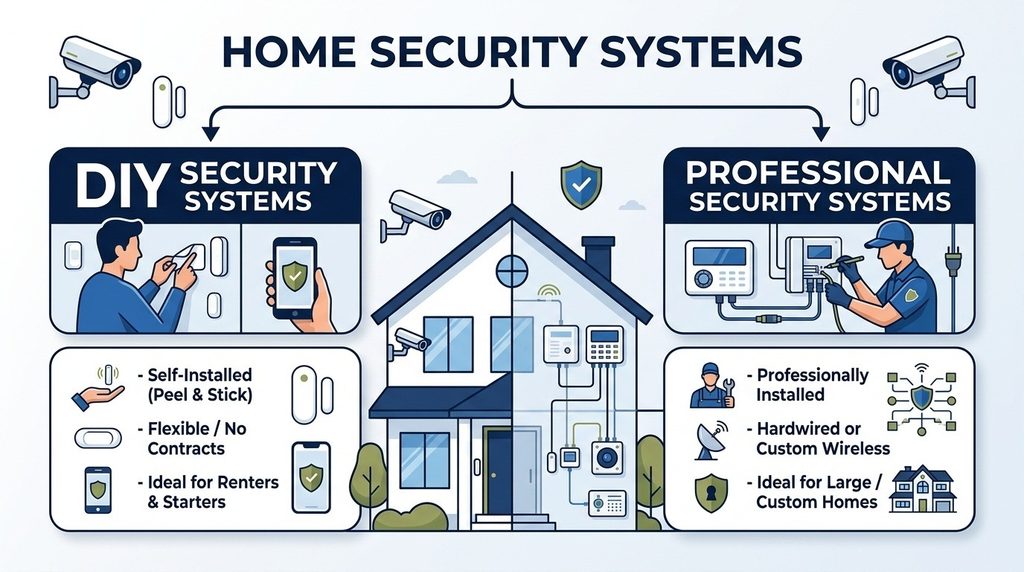
DIY Home Security Systems
Designed for simple installation by the homeowner, DIY home security systems employ wireless sensors with peel-and-stick adhesives or basic screws. The entire equipment package can be installed in less than an hour with no special tools required. Companies such as SimpliSafe and Ring have promoted this adaptable option, which is perfect for renters and budget-conscious homeowners.
Professionally Installed Home Security Systems
Companies like ADT and Vivint have trained alarm system installers who are sent directly to your house for installation. These technicians assess your property layout, install hardwired lines where required, install touchscreens and assemble complex sensors. Professional installation can save you a lot of work and can guarantee that your equipment is installed correctly, although it normally involves the payment of installation fees and service contracts.
Professional Monitoring vs. Self-Monitoring
24/7 Professional Monitoring
Equipment is directly connected to a certified monitoring center. If a door sensor, smoke detector or motion detector alarm sounds, trained personnel confirm the alarm and promptly notify local police, fire or medical services.
Self-Monitoring
System alerts push your mobile device with no extra work. If there is a real break in or threat, you see a live view of the camera on a mobile app, and call emergency services yourself. This means there will be no fees charged for monitoring by the provider each month, however you will need to have your phone with you all the time.
Key Components of a Home Security System
The total home security system comprises of a number of interconnected devices that defend entrance points, in-house rooms and document the activities taking place around your house perimeter.
| Component Category | Device Type | Primary Safety Function |
|---|---|---|
| Control Hub | Central Touchscreen Panel or Gateway | Brain of the system; connects all sensors to Wi-Fi, cellular backup, and monitoring centers. |
| Entry Protection | Door & Window Contact Sensors | Triggers an immediate alarm signal whenever a door or window frame is opened. |
| Space Protection | Motion & Glass Break Detectors | Scans indoor rooms for movement or listens for the distinct frequency of breaking glass. |
| Visual Monitoring | Doorbells, Indoor & Outdoor Cameras | Provides live streaming, motion alerts, cloud recordings, and two-way voice communication. |
| Environmental Safety | Smoke, CO, & Water Leak Sensors | Detects fires, toxic gas leaks, or freezing pipes to prevent massive property damage. |
Home Security Cameras and Video Surveillance
Visual verification is now an integral part of the home defense approach. New home security camera systems can help you see things like package deliveries, pets and confirm any suspicious visitors in real time. When choosing surveillance equipment, make sure it is 1080p or 4K resolution, has night vision, provides clear audio, and has adjustable motion detection zones.
If the perimeter is outdoors, search for a top-notch home wireless camera security system. Wireless cameras use the wireless network inside your home, and they operate on rechargeable batteries or solar panel accessories. There are no holes to be drilled in exterior walls.
How to Choose the Best Home Security System
The key to selecting a home security system that is the best fit for your home is finding the right technology for your living situation. When evaluating the following factors are important considerations:
Home Size and Layout
Security needs are quite different for apartments vs. single-family homes. For a small apartment, it might just need a central unit, two door sensors and a video doorbell. However, the more stories a home has, the more motion detectors it will need, along with glass break sensors on windows on the ground floor and outdoor floodlight cameras, and range extenders to make sure there is a consistent wireless signal over the greater distance.
Home Security System Cost
There are two kinds of safety budgets: monthly monitoring expenses and hardware equipment costs.
- Basic starter packages range from $150 to $300, and a smart home setup that involves multiple cameras is $600 to $1,000 or more.
- Unmonitored DIY systems are free of monthly fees while professional monitoring plans usually start at $20 per month and go up to $60 per month.
Smart Home Ecosystem Integration
If you’re already using Amazon Alexa, Google Assistant, or Apple HomeKit, go for a system that will integrate easily with your existing devices. Deep smart home integration allows you to set up smart home scenes, like dimming the lights and locking the smart door locks when you set up your alarm system before retiring to bed.
Best Home Security System Providers
Comparing home security companies always makes it simpler to choose the right one for your life-style.

Full-Service Professional Security Companies
Alarm companies such as ADT, which have been around for many years, offer a wide range of professional installation, dedicated cell phone backup, and monitoring nationwide. They’re best suited for the homeowner who wants to hand over the keys and let professional technicians handle all issues during installation and ongoing maintenance.
DIY Home Security Companies
The leading home security system companies for do it yourself security systems include SimpliSafe, Ring, and Abode. They remove the need for long-term service contracts, support smooth equipment additions and make it straightforward to handle your setup completely with the straightforward application for a smart cellphone.
Smart Home Security Systems
Businesses like Vivint are unique because they use top-of-the-line equipment and smart automation. The cost and complexity of equipment and setup are higher, but they offer a customized system with AI-based threat deterrence, hands-free smart locks, and comprehensive energy management integration.
How to Install a Home Security System
When you decide to do it yourself or when you have pro techs installing components for you, it is important to understand how to install the different parts of the security system so that you don’t leave any areas unprotected.
Identify Vulnerable Entry Points
Entry doors, windows on the ground floor, access doors on the basement level and private garage doorways.
Install the Central Base Station
Use your main controller in a central, connected area of your home that’s within range of your home’s wireless network.
Install Door and Window Sensors
Attach a magnet on the moving part of all outside entry points and maintain a close fit between the sensor and the magnet.
Install Motion Detectors
Put in motion sensors in hallways and living rooms 6 to 7 feet high and away from direct sunlight and air vents so they do not trigger by environmental conditions.
Install Security Cameras
Install Video Doorbells at main doors and place outside cameras to monitor driveways, backyards and side yards.
Test the Security System
Conduct complete system tests to ensure that all alarms activate as expected and are reliably connected to your mobile application and monitoring center.
Common Home Security Mistakes and How to Avoid Them
Any equipment, even the best, will fail if it is improperly installed or used. Be aware of these common pitfalls in order to protect your home to the fullest extent:
Neglecting Battery Maintenance
Wireless sensors use long-life lithium batteries. Install calendar reminders or look at mobile app battery indicators to prevent devices from going offline due to battery power.
Poor Camera Placement
Do not turn cameras onto bright exterior lights or point shoes into glass windows, as this will distort the night vision infrared sensors.
Ignoring Environmental Safety
Burglary protection is important but property damage from plumbing leaks, freezing weather and CO is a major issue annually. Be sure to include environmental detectors in your security strategy.
Overestimating Wi-Fi Coverage
Wireless video streaming is dependent on the stability of the network bandwidth. If the outdoor cameras are located far away from your main router, use a range extender or mesh node.
Final Thoughts
When choosing the right protection, you need to consider your budget, housing needs, and how much interaction you’d like with the property each day. User friendly diy home security systems are the ideal combination of affordability, no-longer-reliant-on-contract and reliable monitoring that renters and budget-conscious homeowners are searching for.
However, if you have a larger family and a more active homeowner, you might want to opt for the convenience of having your system installed and monitored by a professional service which offers support 24 hours a day.
Once you’ve identified your weak points and the right equipment, and have a monitoring plan that is flexible, you will not find it difficult to implement a plan that works for your property.
Home Security Systems FAQs
How do home security systems work?
They use interconnected sensors, control panels, and cameras to detect unauthorized entry, sounding local alarms and alerting owners or monitoring stations.
How much do home security systems cost?
Equipment ranges from $100 to $600 upfront, while ongoing professional monitoring plans typically cost between $15 and $60 per month.
What is the best home security system?
The best home security system depends on your needs, offering strong sensor reliability, easy app control, affordable monitoring, and flexible hardware choices.
How Does AI Improve Home Security Systems?
AI improves systems by accurately distinguishing between humans, animals, and vehicles, significantly reducing false alarms while enhancing smart video analytics.
Are home security systems worth it?
Yes, they effectively deter intruders, provide immediate emergency assistance, protect property investments, and lower homeowner insurance premiums in many regions.
What Are the Best Wireless Security Systems for Home?
Wireless systems are ideal for most homes because they offer easy installation, flexible component placement, and simple expansion without drilling walls.
Which Fire Detection System Should I Buy for My Property?
You should buy interconnected photoelectric smoke and heat detectors that integrate directly with your central home security panel for instant alert notifications.
