

AI Interior Design: Visualize Your Home Renovation
When you’re planning a big home renovation, it’s great that you are excited, but it’s also quite a bit of uncertainty. Determining what cabinets will look like in your dark kitchen or whether a bright paint color will create a cozy or cramped atmosphere in your living room can be difficult. Homeowners used to have to use 2D blueprints, high cost interior designers, and pure imagination. In today’s world, however, everything has been transformed by modern technology.
By learning to visualize home renovation with AI, you can visualize finished concepts without having to destroy a single wall. You can make swaps of materials, try out different layouts and design styles in seconds by uploading a picture. Smart design software gives you the confidence to make decisions, reduces risk of expensive errors, and ensures effective communication with contractors.
Why is it important to use AI for visualizing your home renovation?
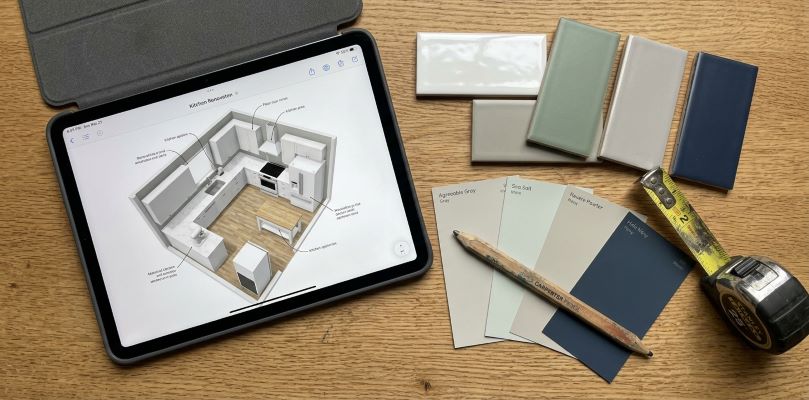
It’s important to know the reasons digital rendering software has become so popular for home projects before examining specific tools. When you imagine your renovation first, you have a complete control over the creative process and maintain your budget.
- Save thousands on changes: When a digital model is made, changes are free. It can cost thousands of dollars in delay and waste to change your tile, flooring or layout half-way through the construction.
- Make quick paint decisions: You can see dozens of variations without having to wait weeks for paint swatches.
- Communicate with the contractor more effectively: Give your contractor a clear picture of what you want to do; there is no room for misunderstanding from the outset.
- Try out adventurous design ideas without risking anything: Love the idea of dark green cabinets, but don’t know how they will look with brass hardware? Make risks without risking yourself physically.
Best AI tools for home visualization
The choice of platform depends on the scope and budget of your project, as well as your familiarity with digital platforms. Below are the best software available today used by homeowners.
AI Interior Design Platforms and Generators
For quick concept renders that you can get directly from your smartphone or laptop, an AI interior design generator is the fastest way to get them. These websites allow you to upload a photo of the room you are interested in and choose a style, after which you can see the high resolution transformations in seconds.
- DecorAI: Great for photo-realistic transformations with room’s real structural lines, windows, and doorways.
- Spacely AI: Perfect for experimenting with new looks and finding inspiration for various room setups.
- REimagine Home: Great for virtual staging and outside home remodel ideas.
People who are not familiar with any interior design styles often begin their interior design process by using an ai interior design generator to come up with general ideas and creative directions, before they finally select a particular style or furniture or material.
Complete AI Interior Design Software and Apps
Whereas, in larger projects, there are specific mobile applications and design suites available that provide greater control. A separate ai interior design app will enable you to have access to multiple project folders, save favorites and share updates directly to family members or contractors.
From mobile aids to comprehensive interior design software, contemporary apps can serve a variety of purposes, from a quick changeover to a complete reimagining of a building. For the best ai interior design app, opt for those systems that provide spatial accuracy and exact prompt controls.
The beauty of using targeted AI tools for home renovation is that you’ll be able to discover platforms that are tailored to your specific project requirements, from kitchen counter swaps to floor plan rearrangements.
Tool Comparison for Planning Your Renovation
To help you choose the best ai for interior design, here is how popular categories match up against typical renovation needs:
| Category | Typical Strengths | Best Use Case |
| Dedicated AI Apps | Fast photorealistic renders, mobile convenience, structural retention | Quick room refreshes, surface material swaps |
| Generative Web Platforms | High customization, text prompt options, style mixing | Early-stage brainstorming, mood board creation |
| Floor Plan & CAD Hybrids | Exact measurements, 2D to 3D rendering, layout adjustment | Structural wall removals, full home layouts |
How to leverage AI for Home Renovation – Step by Step Guide
With a clear process, using digital visualization platforms is easy. Let’s take a closer look at how you can leverage AI for your home improvement projects, no matter their size.
Step 1: Take good quality photographs
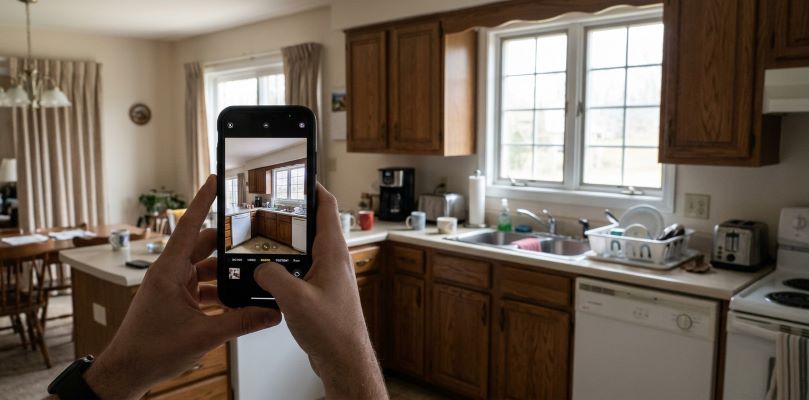
Begin by taking clear shots of the room you are in. Stay in a corner or door opening to get into as much room as possible. Minimize clutter and open blinds to make it brighter and more natural. The purer your base image the closer your final image will be to the true one.
Step 2: Upload and then select your preferred tool
Choose a widely used Ai Interior Design Generator or App. When on a budget, consider the top ai interior design app free, which provide trial generation credits instead of paying a subscription fee. Drag and drop your clear room image into the platform.
Step 3: Select the Design Style and Prompts
Choose one of the design styles: Modern Farmhouse, Industrial, Mid-Century Modern, Scandinavian. Typically, most platforms come with pre-programmed styles or give you the option to add your own text prompts. Get specific on what you’d like changed, whether it’s a different kind of flooring, cabinet finishes, or the colors you’d like.
Step 4: Make refinements and repeat
Consult your first work products. If the generated image modifies a window location or architectural detail that you intend to retain, tweak the creativity sliders to modify it again or change your text prompt. Test several iterations until you get an overall style.
How to get realistic results with Best Practices
Contemporary systems are also strong but need to be input with clear information to get practical output. Keep these helpful tips in mind
- Highlight the need to preserve existing structure: Communicate to the app what elements of the structure cannot be moved so that the renders will be useful.
- Think consistency: Make sure to consider how the light reflects in your renders to plan in artificial and natural lighting additions.
- Create color palettes: Get a paint color match from your favorite renders at your local home improvement store.
- Include and compare real samples and visuals: Use fabric, tile, and wood samples as references with digital designs before ordering.
Identifying affordable and complimentary alternatives
Large budgets aren’t necessary to begin brainstorming design ideas. Trying something new without spending any money? Find a good best ai interior design app free trial, offering a daily rendering option.
Some of the best ones, such as ai for interior design web tools and apps, offer free credits or starter plans each day. With a top-performing best ai interior design app, you can try out ideas in your living room, kitchen, or bedroom without investing in expensive upgrades or professional design software subscription.
The best answers to the question of what are the best ai apps for interior design, is to try out two or three, and see which interface feels like it’s the natural one.
Here are some common mistakes to steer clear of when leveraging AI for renovations.
While it’s great to view a home virtually, beware of these common mistakes
- Realistic dimensions: Generative models are concerned with mostly aesthetics but not exact measurements. Don’t purchase furniture without measuring the space first.
- 100% similarity of the product: Renders with furniture and fixtures in general. Do not use them as catalogs of products.
- Considering structural feasibility: An image could easily remove a wall, which might be a load-bearing wall. When it comes to demolition, always remember to seek advice from a licensed contractor or ‘structural engineer’.
Digital visualization of your house
- Explore cabinet styles, island sizes, and even quartz vs. granite countertops in the kitchen.
- Update Bathrooms compare Walk-In Shower Layouts, Vanity Finishes & Tile Patterns without touching plumbing.
- Living Spaces play with different furniture layouts, accent colors in walls and lighting positions.
- Exterior Renovations see some new siding colors, roofing options, porch options and front door styles.
AI-powered visualization solutions enable you to get a step-by-step blueprint of your renovation using dedicated AI tools.
Frequently Asked Questions
Can AI replace a professional interior designer?
No. Generative tools excel at visual inspiration and initial style exploration. However, professional designers handle technical spatial planning, local building codes, sourcing real materials, and project management.
How accurate are AI room visualizations?
Most modern apps preserve surrounding architecture with high visual accuracy. However, they reflect general design concepts rather than precise technical drawings. Always verify exact measurements physically.
Is there a truly free ai interior design app?
Yes, several popular apps offer free daily credits or starter plans that require no credit card upfront, allowing you to test basic room renders without paying.
Can I use AI to plan outdoor renovations?
Yes. Many platforms handle exterior walls, siding materials, backyard patio layouts, landscaping features, and roofing options.
Transform Your Home with Confidence
Remodeling your home should be an enjoyable, creative experience. Learning how to use AI for home renovation eliminates guesswork, cuts unnecessary costs, and lets you explore endless style possibilities with total peace of mind. By picking the best ai for interior design for your needs, you can test paint colors, experiment with layouts, and perfect your vision before starting your project. Upload a clear photo of your space today and start bringing your dream home to life.
